
Crypto Portfolio Tracker: Track Your Crypto Holdings & Profits with Ease

Are you tired of managing multiple exchange apps, wallet addresses, and spreadsheets just to track your crypto investments? Many beginners often ask, “How can I monitor my crypto portfolio all in one place?” The answer lies in using a crypto portfolio tracker—an all-in-one tool that allows you to view all your coins, balances, and profit/loss in real time.
In this guide, we introduce Crypto Mental Log’s Portfolio Tracker, a free, user-friendly tool designed for beginners. It consolidates your holdings into a single interactive dashboard. You’ll learn why a portfolio tracker is essential, how to use our tool step-by-step, its key features (such as profit and loss tracking and coin allocation charts), security measures, and more. By the end, you’ll be equipped to track your crypto portfolio effortlessly and make more informed investment decisions.
The Crypto Mental Log Portfolio Tracker provides a unified view of all your crypto holdings with interactive charts and detailed breakdowns. Its intuitive interface lets you quickly see your total portfolio value, asset allocation, and profit/loss at a glance. With everything in one place, you can spend less time updating spreadsheets and more time refining your strategy.
Why You Need a Crypto Portfolio Tracker (Unified Dashboard)
Whether you’re a casual holder or an active trader, it’s likely that you manage cryptocurrency in multiple locations—such as a hardware wallet like Ledger, a mobile wallet app, and accounts on exchanges like Binance or Coinbase. Manually logging into each account to check balances, tracking purchase prices in a spreadsheet, and calculating profits can be time-consuming and prone to errors. This is where a unified crypto portfolio dashboard—a portfolio tracker—becomes invaluable, allowing you to keep track of your portfolio with peace of mind.
A good crypto portfolio tracker automatically:
- Aggregates all your holdings into one view: By connecting multiple wallets and exchanges, the tool combines them into a single portfolio summary showing your total balance and profit/loss.combines them into a single portfolio summary with your total balance and profit/loss.
- Visualizes your asset allocation: Instantly see what percentage of your portfolio each coin or token represents, helping you identify any over-concentration in a specific asset and manage risk accordingly.
- Updates in real time: You won’t need to constantly refresh or manually input prices, as the tracker fetches live market prices (in USD or your preferred currency), ensuring your portfolio value and profit/loss update automatically.
- Generates reports and charts: With centralized data, you can easily create shareable charts or export your portfolio information. This is useful for keeping records, handling taxes, or sharing your investment performance on social media.
In short, using a crypto portfolio tracker means less time crunching numbers and more time focusing on strategy. You’ll always know exactly where you stand—what coins are driving your profits, which holdings are lagging, and how your overall crypto net worth is changing over time—all without the hassle of manual tracking.
Key Features of the Crypto Mental Log Portfolio Tracker
Our Portfolio Tracker serves as an all-in-one tool for tracking your crypto profits and managing your coins. Here are the key features that make tracking your crypto easy and efficient:
- Connect Multiple Wallets & Exchanges: Easily add any public wallet address (such as Ethereum, BSC, Polygon, Avalanche, and more) to include those holdings in your dashboard. You can also connect read-only exchange API keys from major exchanges like Binance, Coinbase Pro, or Kraken. Rest assured – these API keys are read-only, allowing the tracker to view balances and trades without moving your funds. The tool supports numerous DeFi protocols, enabling you to include staking or yield farming positions. Essentially, you can aggregate virtually any crypto account or address, making it a comprehensive coin portfolio tracker for all your assets.
- Real-Time Valuations: The tracker pulls pricing data every minute from leading liquidity sources, ensuring your portfolio’s value is always current. This means you’ll see an up-to-the-second valuation of your holdings in USD or your chosen fiat currency, without needing to perform manual price checks. If the market fluctuates by 10% in an hour, your dashboard reflects this change automatically.
- Interactive Charts for Allocation & Performance: Visual charts help you easily understand your portfolio’s breakdown and profit/loss at a glance. The Allocation Pie Chart displays what percentage of your total portfolio value each coin represents, helping you identify if you are overly invested in any one coin. The Performance Pie Chart highlights your winners and losers (with green slices for profitable holdings and red for those at a loss). You can hover over or tap on any chart slice to see exact dollar values and percentage changes. These charts transform raw data into insights — for instance, you might discover that one coin has grown to comprise 50% of your portfolio or that a small altcoin is actually your top performer.
- Detailed Coin Breakdown Table: Below the charts, a breakdown table lists each cryptocurrency you hold along with practical details such as the quantity owned, average purchase price (cost basis), current market value, and unrealized profit or loss for each coin. You can sort this table by various columns, allowing you to easily view your Top Gainers and Top Losers or sort by largest holdings. This detailed view acts as your personal crypto profit and loss tracker for each asset, clearly showing how much you’re up or down on every coin in your portfolio.
- Profit & Loss Tracking Over Time: In addition to the current snapshot, our tracker allows you to monitor your portfolio’s performance over time. A time-series graph plots your total portfolio value (net worth) across different periods. You can adjust the timeframe to 7 days, 30 days, 90 days, year-to-date, or even a custom date range. If you want to see how your portfolio performed compared to the market, you can overlay benchmark indices like Bitcoin or Ethereum prices on the graph for comparison. The tool also marks major drawdowns (your worst peak-to-trough declines) on the chart, enabling you to identify your risk exposure during volatile periods. This historical profit and loss tracking helps you detect trends and learn from the past, such as identifying times when you should have taken profit or how a new coin addition (like an airdrop or significant purchase) affected your overall portfolio performance.
- Custom Labels & Notes: If you manage multiple accounts or share a tracker with family members, our labeling feature is invaluable. You can assign custom labels to each connected address or account (for example, label one wallet as “Main Wallet,” another as “DeFi Yield Account,” and an exchange API as “Trading Account”). This allows you to group and filter by these labels to analyze specific sections of your portfolio (for instance, see how all your “DeFi” tagged wallets are performing collectively). Additionally, you can attach personal notes to each coin or address — jotting down your strategy, rationale for a trade, or notes for taxes. This feature turns the portfolio tracker into a mini journal, providing context to your numbers.
- Alerts and Watchlist: Stay informed about market movements with customizable alerts. You can set price alerts (for example, get notified if Bitcoin drops by 10% in 24 hours or if a coin you’re monitoring rises above a certain price) as well as profit/loss alerts (for example, if an asset in your portfolio gains +20% or falls -5% from your cost basis). Alerts are sent via email or in-app notifications, so event if you’re not constantly checking the app, you’ll be informed of significant occurrences. Additionally, you can maintain a small watchlist of up to 5 coins you don’t yet own, and the tracker will show you hypothetical scenarios of how adding those would affect your portfolio. This is a great way to test different “what-if” situations before actually purchasing a new coin.
- Export & Share: If you need to conduct analysis outside the app or share your results with someone, you can export your portfolio data at any time. Download a CSV file of your current holdings or even a PDF report with your historical performance graphs. There’s also a simple option to generate a detailed report.
With these features, the Crypto Mental Log Portfolio Tracker simplifies the process of managing and optimizing your cryptocurrency investments.
Getting Started: How to Track Your Crypto Portfolio in Minutes
One of the best things about our crypto portfolio tracker tool is how quick it is to set up. Follow these simple steps to start tracking your crypto holdings and profit/loss:
- Create Your Free Account: First, sign in or register for a free account on Crypto Mental Log. The Portfolio Tracker is free to use – you just need an account so we can securely store your portfolio data (encrypted, of course).
- Open the Portfolio Tracker: Once logged in, navigate to the Portfolio Tracker section from the main menu on our site. This will bring up the dashboard interface.
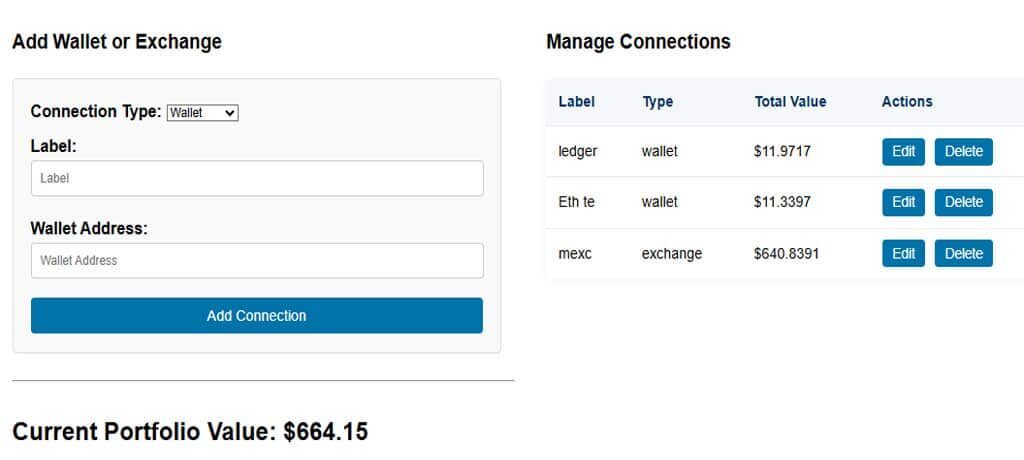
- Add a Wallet or Exchange: Click the “Add New Address” button to connect a source of your crypto holdings. You’ll be prompted to choose either Wallet or Exchange:
- For a crypto wallet, simply paste your public wallet address (for example, your Ethereum address starting with
0x...or a Bitcoin address). No private keys needed! The tracker will use the public address to fetch your balance. - For an exchange account, enter a read-only API key from your exchange (such as Binance or Coinbase). Make sure the API key has no withdrawal permissions – only balance/read access. (Most exchanges let you create an API key and toggle it to have “read info” only.)
- After pasting the address or API key, give it a custom label like “Main Trading Wallet” or “Binance Account” so you can easily recognize it later.
- Hit “Add Connection” to save it.
- For a crypto wallet, simply paste your public wallet address (for example, your Ethereum address starting with
- View Your Unified Dashboard: Once you add a connection, the Portfolio Tracker will automatically scan the wallet or exchange and retrieve your crypto holdings. Within moments, your dashboard will populate with all the coins and tokens from that source, combined with any others you’ve added. Your pie charts will update to reflect these assets, and the table will list every coin across all connected accounts. By adding all your wallets and exchanges, you’ll get a complete 360° view of your crypto portfolio in one place!
- Explore and Customize: Now you can interact with the charts, check your profit and loss (P&L) graph over different timeframes, and sort through your coin breakdown table. If you want to stay informed without constantly watching the screen, set up alerts for price movements or profit changes. Tailor the tracker to your needs—for example, enable email notifications for significant market swings or use labels to differentiate between your “long-term HODL” holds and your “trading” stash.
- Mobile Access: The Crypto Mental Log Portfolio Tracker is fully mobile-responsive. You can log in via your phone or tablet’s web browser and access the same unified portfolio view on the go. No desktop computer is required—check your crypto portfolio anytime, anywhere.
That’s it! In just a few minutes, you’ll have your crypto portfolio aggregated and updated in real-time.
NNext, we’ll address some common questions beginners have about using a crypto portfolio tracker.
Crypto Portfolio Tracker Basics
Below, we answer some frequently asked questions about crypto portfolio trackers and how to use Crypto Mental Log’s tool:
To track your crypto portfolio across all your wallets and exchanges, use a crypto portfolio tracker. A portfolio tracker consolidates your crypto holdings into one dashboard. Simply connect your various accounts (via public wallet addresses or read-only API keys), and the tracker will automatically update your balances and calculate your overall profit/loss. Crypto Mental Log’s Portfolio Tracker is a free, beginner-friendly option that makes it easy to see everything in one place without manual effort.
The Portfolio Tracker is a free, intuitive dashboard by Crypto Mental Log that aggregates any crypto wallet address or exchange account into one unified view. It helps you monitor your overall portfolio balance, track profits and losses (PnL) for each asset, view asset allocation, and review historical performance—all without the need for spreadsheets.
You can add any public wallet address from major chains (Ethereum, BSC/BNB Chain, Polygon, Avalanche, Bitcoin, etc.). You can also connect accounts from popular exchanges like Binance, Coinbase Pro, Kraken, and more using read-only API keys. The tracker even supports many DeFi platforms (like Uniswap, Aave, Yearn) to fetch balances from liquidity pools, staking, or yield farms. In short, almost any place you hold crypto can be included in the tracker.
The portfolio tracker pulls pricing data from reliable sources (like large exchanges or aggregators) approximately every minute. Your dashboard then updates automatically to reflect the latest prices for all your coins. At any given moment, you’re seeing the real-time USD value of your holdings. You don’t have to manually enter prices—the system does it for you, acting as a live crypto profit tracker that recalculates your gains and losses as the market moves.
It’s simple. When you’re in the Portfolio Tracker, click on “Add New Address.” Choose whether you’re adding a Wallet or an Exchange. Then paste the required info:
If it’s a wallet, input your public wallet address (for example, your Ethereum address or Bitcoin address).
If it’s an exchange, enter the API key (read-only) provided by that exchange.
Assign a label (e.g. “My Coinbase Wallet” or “Binance Trading Acct”) and hit Add Connection. The system will then scan that address/account and start displaying the balances and coins in your dashboard automatically.It’s simple. When you’re in the Portfolio Tracker, click on “Add New Address.” Choose whether you’re adding a Wallet or an Exchange. Then paste the required information:It’s simple. When you’re in the Portfolio Tracker, click on “Add New Address.” Choose whether you’re adding a Wallet or an Exchange. Then paste the required info:
If it’s a wallet, input your public wallet address (for example, your Ethereum address or Bitcoin address).
If it’s an exchange, enter the API key (read-only) provided by that exchange.
Assign a label (e.g. “My Coinbase Wallet” or “Binance Trading Acct”) and hit Add Connection. The system will then scan that address/account and start displaying the balances and coins in your dashboard automatically.
The Allocation Chart is a pie chart breaking down what percent of your total portfolio value each coin represents. For example, it might show Bitcoin 40%, Ethereum 25%, Solana 10%, etc., giving you a quick sense of your diversification. The Performance Chart is another pie chart that shows your profit vs loss distribution – essentially which holdings are in the green (profitable) versus in the red (at a loss). In the performance chart, green segments indicate positions where the current value is above what you paid (unrealized profit), and red segments indicate positions below your cost (unrealized loss). You can hover over or click on slices of these charts to see details like the exact dollar amounts and percentage change for that segment.
Yes — the Portfolio Tracker includes a time-series graph that acts as a crypto PnL tracker for your entire portfolio over time. You can view how your portfolio’s total value has changed over different time periods (7 days, 1 month, 3 months, year-to-date, etc.). You can also overlay benchmarks (like BTC or ETH prices) to compare your performance to the market. The graph automatically marks major drawdowns (big drops), so you can quickly identify when your portfolio suffered the most and how long it took to recover. This feature helps you analyze your investment performance and risk over time, not just the current snapshot..
Custom labels let you tag each connected wallet or account with a name or category. This is useful if you have different goals for different holdings – for example, label one wallet “Retirement Fund” and another “Trading Stack,” or tag certain wallets as “DeFi” if they’re used for decentralized finance investments. It helps keep your dashboard organized and lets you filter or group your portfolio by those labels.
Alerts allow the tracker to notify you of important changes. You can set a price alert (e.g., alert me if Ethereum drops by 10% in 24 hours, or if Bitcoin crosses above $30,000) or a PnL alert (e.g., alert if my portfolio’s value increases or decreases by 5%, or if a particular coin’s profit/loss hits a certain threshold). Alerts are sent via email or as in-app notifications. They ensure you don’t miss critical market moves or portfolio changes, even if you’re not actively watching the app.
Security is a top priority. All exchange connections are read-only – we never ask for API keys that have withdrawal or transfer permissions, and we never request private keys for wallets (you only provide public addresses). This means the Portfolio Tracker cannot move your funds; it can only view balances and transaction history. All data you do provide (like your wallet addresses, API keys, and any notes) is stored securely with AES-256 encryption (an industry-standard strong encryption) on our servers. We are fully GDPR compliant and we do not share your personal data with any third parties. You remain in control of your data – you can remove any connected account or delete your data at any time. Additionally, you have the option to enable two-factor authentication (2FA) on your Crypto Mental Log account (via Google Authenticator or Authy) for an extra layer of login security. We also commit to full transparency: there are no hidden fees for using the Portfolio Tracker and no sneaky data-sharing shenanigans. Your trust is important to us, and we’ve built the tool with that in mind.
Yes. You can easily export your data if you want to do additional analysis or keep records. The tracker lets you download a CSV file containing your current holdings and transaction data. You can also export a PDF report that includes your portfolio charts and performance over time – useful for presentations or personal archives. If you want to share your portfolio overview with someone (maybe you want a second opinion from a friend or you’re bragging about your gains on social media!), you can generate a read-only shareable link. This link will show an up-to-date snapshot of your portfolio’s key metrics and charts, but it won’t allow anyone to alter your data or see sensitive info. You’re in control of turning the link on or off, so you can share it temporarily and disable it whenever you choose.
Getting started is quick and free. Just sign up for a Crypto Mental Log account (or log in to your existing account), then navigate to the Portfolio Tracker page on our site. Once there, click “Add New Address” to begin connecting your wallets and exchanges one by one. After adding your first connection, you’ll see your dashboard spring to life with your portfolio data. From there, you can continue to add additional addresses, set up any alerts, and explore all the charts and tables. Within a few minutes you’ll have a comprehensive view of your crypto holdings – and you’ll never have to manually update a spreadsheet for your coins again!
Final Thoughts
In the fast-paced world of crypto, having a consolidated view of all your holdings is no longer optional – it’s essential. A quality crypto portfolio tracker brings order to the chaos by automatically visualizing your profits and losses, your asset allocation, and your portfolio’s performance history all in one place. This clarity helps you spot risks (like over-investment in one coin), recognize opportunities to rebalance or take profits, and make data-driven decisions rather than emotional ones.
Don’t let managing your crypto investments feel like herding cats. Try our Crypto Mental Log Portfolio Tracker today and experience how effortless portfolio tracking can transform your trading and investing routine. With clear charts, real-time updates, and robust security, you’ll wonder how you ever tracked your crypto without it!
✅ Action Steps to Get Started Now
- Sign Up & Connect a Wallet: Create your free account and add at least one crypto wallet address or exchange account to see your real-time portfolio in action. It only takes a minute to start tracking your crypto portfolio with live data.
- Review Your Dashboard: Take a look at your allocation pie chart – are you comfortable with the percentages of each coin? Check your profit/loss – do you need to take some profits or cut losses? Use these insights to decide if you want to rebalance or set any alerts going forward.
Stay informed, stay efficient, and keep emotion out of the equation – because in crypto, knowledge is your best edge. Happy tracking, and best of luck with your investments!
✅ Action Step
- Add at least one wallet address now to see your real-time holdings.
- Review your allocation pie chart and decide if you need to rebalance.
Stay informed, stay efficient, and keep your emotions in check—because knowledge is your best edge.
If you found this content helpful,please consider sharing!: